
🧠FIRST LINE AI complete manual

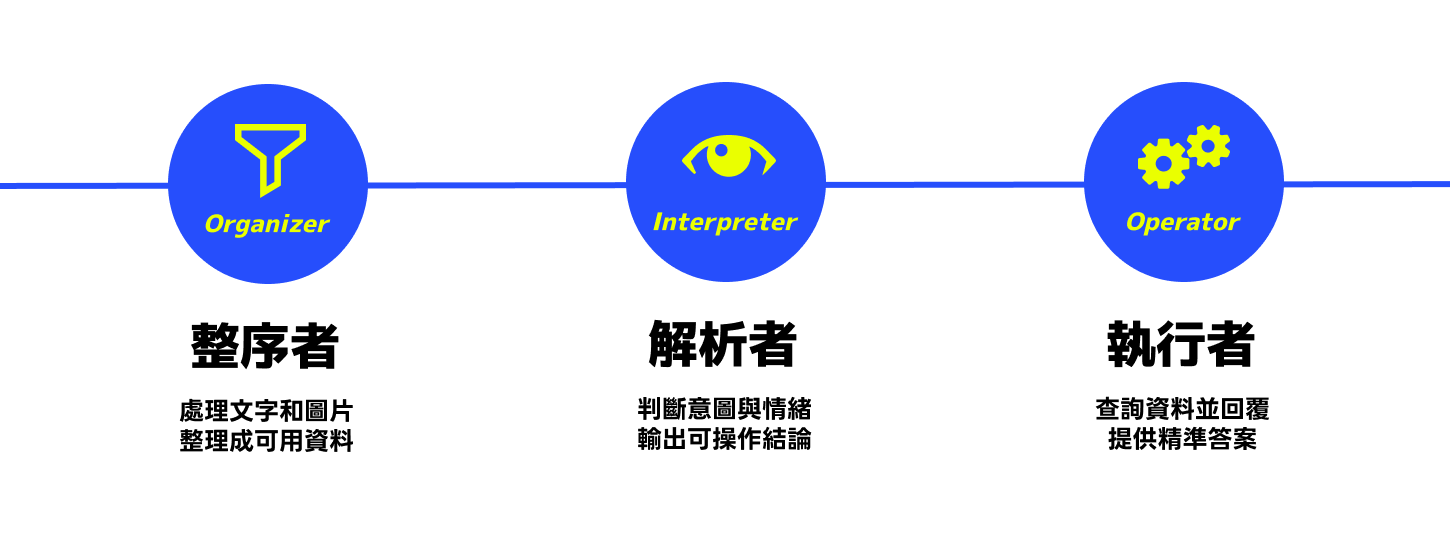
AI customer service is no longer the early-stage chatbot that relies on templated replies, but an intelligent support system that can understand semantics, judge context, and execute actions. To keep things controllable, adjustable, and measurable in real-world scenarios, we split AI capabilities into three core roles and assign multiple dedicated agents to different tasks, rather than relying on a single, all-powerful yet hard-to-manage giant model.
This design allows each agent to focus on a clear purpose: organizing, judging, or executing. The benefits are higher accuracy, lower cost consumption, predictable behavior, and flexible combinations to fit needs—creating an AI customer service experience that truly aligns with on-site processes.
FIRST LINE AI is a no-code building tool that enables teams to establish intelligent workflows in the shortest time, handing tedious manual tasks over to AI for automated processing and deploying directly within everyday work contexts.
Through intelligent workflows, you can automate repetitive tasks, free up time for more strategic work, and seamlessly embed AI into existing processes to immediately improve efficiency without restructuring. These workflows operate based on clear rules—AI analyzes and processes according to natural-language instructions. Combined with FIRST LINE’s intuitive no-code interface and rules engine integration, businesses can complete a usable, controllable, and maintainable AI workflow within minutes.
💡 Some advanced settings will go live in 2025 Q4
Some of the settings mentioned below will be 2025 Q4 officially launched. We will continue expanding available capabilities to create a more complete and flexible AI workflow experience.
Preparer — The frontline member that turns noise into usable data
The preparer converts unstructured customer-provided materials—text, conversations, images—into clear information the system can use, typically serving as the data entry point for the entire process. It consists of two nodes:AI Custom Agent (Text) and AI Image Agent (Image), which handle different types of raw data respectively, ensuring all subsequent automation operates from a correct and clean starting point.
AI Custom Agent
Focused on text organization, it can structure long conversations, support records, and ticket contents into structured information, including summaries, key field extraction, and formatted outputs. With custom logic settings, it can produce consistent and usable data according to the needs of different departments, avoiding repetitive manual organizing and reducing the risk of omissions or misunderstandings. Its role in the journey is the “rectifier of text messages,” enabling all subsequent AI to make judgments and respond based on the cleanest inputs.
Setting name
Purpose description
Examples/Supplements
Number of conversation messages
Decides how many prior messages the AI will reference when performing a task. If this node only needs to act on instructions without context, select “Exclude messages” to reduce interference.
Options: Exclude messages, Last 1, Last 5, Last 10, Last 20, Most recent majority of messages.
Custom instructions
Describe this AI’s purpose, behavior, and prohibitions to lock it into only doing “content processing/organizing,” without additionally querying the knowledge base or product data.
Examples: consolidate messages, extract customer information, format into bullet points; remind “only process existing content, no need to supplement with external information.”
Variable name
Specify which variable to store the overall output of this node for later nodes to reference.
Ex:feedback,summary,clean_content.
Custom output
Define the “field structure” to be output by this node. You can add multiple attributes (up to 5), each with a specified name, type, and prompt. The AI will produce results according to this structure, making it easy to use later as variables.
After enabling, you can add 1–5 attributes. For example: Attribute name:customer_name, Type: Text, Prompt: “Customer name, keep only a single name.” Later you can read with {{ response.customer_name }} .
💡 The custom agent can also do lightweight judgments
In addition to organizing content, the AI Custom Agent is suitable for simple one-step judgments. For example, it can directly output status, and fill in conclusion fields such as return,order based on the context, then hand it off to subsequent variable-judgment nodes. When the logic only needs to produce a clear single result, the custom agent can complete “organize + judge” at once, avoiding stacking too many AI judgment agents in the flow.
AI Image Agent
handles image information, such as product photos, invoices, or malfunction screens, and automatically extracts required fields like model, serial number, amount, date, or damage location. It converts image content directly into a machine-processable format, reducing human interpretation differences and speeding up issue localization. It plays the role of “decoder of visual data” in the journey, ensuring image materials are no longer just attachments but truly usable data sources for subsequent processes.
Setting name
Purpose description
Examples/Supplements
Custom instructions
Specify what information this image agent needs to detect, recognize, or extract from images. Used to tell the AI which fields to obtain, content formats, and misjudgments to avoid, etc.
Examples: – Detect product model and serial number – Recognize receipt amount, date, and items – Extract damaged parts and condition descriptions
Storage variable name (image_analyzer)
Define which variable to store the results after AI finishes image analysis for subsequent nodes (such as the parser or answer agent) to use.
Common names:image_data,parsed_image,feedback
Custom output
Define a fixed output structure for post-image-analysis results as needed. You can set up to 5 fields. Each field includes sub-settings such as “attribute name, type, prompt,” enabling the AI to output data in a stable specified format.
Example:
Field 1:product_model(Text) Prompt: “Product model recognized from the image”
Field 2:price(Number) Prompt: “Total amount on the receipt” Later you can read with {{ response.product_model }} Read
💡 The image agent can trigger the combo of “Image → Question → Answer”
The AI Image Agent can not only extract data, but also be used in more practical scenarios, such as business card recognition, product recognition, or identifying the main object in an image and then inferring the customer’s likely question. Paired with the AI Answer Agent, it forms the combo “Image → Auto-interpretation → Auto-answer,” enabling customers to simply upload an image and have the system automatically provide the most likely answer and next-step suggestions.
Overall, the preparer makes raw messages judgeable, answerable, and automatable, forming the foundation that allows the entire service process to run smoothly.
Parser — Understand “what this message is actually trying to do”
The parser extracts the customer’s true intent, emotional state, and necessary conditions from complex messages and converts them into system-ready judgments, such as “Return intent = true” and “Needs additional information = true.” It’s the key filter in the entire process, turning vague statements into actionable signals.
AI Judgment Agent
This agent specializes in logical judgments, intent classification, and status labeling, serving as the “intent recognition core” of the overall journey.
Typical uses of the parser include identifying intents like return, purchase, or booking; interpreting negative or urgent emotions; and automatically driving subsequent processes, such as adding tags, prioritizing assignment, or sending requests for additional information. With confidence thresholds and composite logic settings, the parser ensures the system can quickly and reliably determine “what to do next” for every incoming message, improving overall efficiency and consistency.
Setting name
Purpose description
Examples/Supplements
Text message scope for judgment
Decide how much prior context the judgment logic should reference to reduce misjudgment. If the intent comes from the last one or two sentences, narrow the scope; if judgment requires conversation context, use more messages.
Options: — Last 1 — Last 5 — Last 10 — Last 20 — Most recent majority of messages
Determine intent
Define the conditions, scenarios, or logic the AI should check, ranging from simple intents (e.g., “Does the user want to return the item?”) to composite judgments (multi-condition AND/OR).
Examples: — Determine whether it is a return intent — Determine whether the customer expresses negative emotion — If necessary information is missing, mark as needing additional data
Default to match (Enable/Disable)
When the AI refuses to analyze due to inability to interpret, insufficient information, or sensitive content in messages, should the system automatically treat the judgment result as “matched.” This can be used to avoid process interruption.
Recommended usage: — Enable if the process cannot be interrupted — If judgments must be highly precise, consider disabling
Variable name (feedback)
Store the AI’s analysis conclusion or explanatory text for use by subsequent nodes (such as routing, tagging, or notifying agents).
Common naming conventions:intent_result,analysis,feedback
💡 The clearer the judgment logic, the more stable the results
Rather than writing “Determine whether the customer wants to return,” explicitly tell the AI: “If the message contains words like return, don’t want it, or product has issues, then judge as return intent.” Clear conditions can significantly reduce misjudgment rates.
Executor — Responsible for carrying out corresponding actions
The executor’s role is to turn information into action. It retrieves data, matches knowledge bases, and composes responses that can be directly provided to customers, ensuring issues receive accurate, complete, and consistent answers immediately. Whether it’s product usage, order status, or store information, the executor can respond in real time, avoiding manual lookups and repeated confirmations.
AI Answer Agent
This agent handles knowledge base retrieval, response generation, and content risk control, serving as the “answer delivery core” of the entire process.
Common uses of the executor include real-time FAQ answering, supporting support teams in maintaining consistent response quality during peak times, and automated replies across multiple languages and platforms. By connecting to up-to-date data sources, it can greatly reduce misinformation and outdated answers, and automatically refuse to answer sensitive content to maintain brand safety.
Overall, the executor is responsible for quickly turning each request into “the correct answer,” so customers don’t have to wait and agents don’t have to repeatedly look up information, making the entire journey smoother and more trustworthy at key points.
Setting name
Purpose description
Examples/Supplements
Data sources
Specify where the reply content is obtained from. The AI will only answer based on these sources and will not guess or supplement information on its own.
Options: — Knowledge base — Products — AI training resources Note: If sources contain sensitive content such as hate/violence/sexual/self-harm, the system will automatically prohibit adoption.
Specify knowledge base category/subcategory
Constrain the knowledge scope the AI retrieves to avoid overly broad searches that cause imprecise answers.
Example: Category “Logistics,” subcategory “Delay explanations.”
Fallback message when information is not found
The default fallback message used when the knowledge base cannot find an answer or the content cannot be replied with.
Example: “Sorry, we can’t find relevant information at the moment. If you need human assistance, please type: transfer to human.”
Waiting message
The prompt text displayed while the AI is retrieving data, used to reduce waiting anxiety. Multiple messages can be set to rotate.
Examples: — Thinking… 🤔 — Let me check the information…
Feedback setting (Enable/Disable)
When enabled, after the AI replies, it will ask the customer for feedback (“Helpful/Not helpful”) to support subsequent processes.
Used to evaluate answer quality and collect customer experience.
Feedback message
The feedback question displayed after the answer.
Example: “Did the above information help you?”
Feedback options
Quick-reply buttons for customers to choose from.
Default: — Helpful 👍 (value = 1) — Transfer to human 🧑 (value = -1)
Use specified variables (Advanced)
If customer data has been written into variables by previous nodes, you can use the variable content for retrieval instead of the latest conversation.
Suitable for: retrieving based on data obtained from image/judgment nodes.
Conversation persona (stylized responses)
Have the AI generate responses according to persona style (tone, personality) to increase interactivity, though it may reduce controllability.
Sample personas: Professional support, humorous support, calm technical support, etc.
Store customer feedback
Store the “Helpful/Not helpful” result into a variable (1 or -1) for flow routing or subsequent analysis.
Example: Variable name:faq_feedback
Attach knowledge base share link (Enable/Disable)
Include source article links in the reply to increase transparency and credibility, making it easier for customers to verify details.
Applicable to after-sales FAQs, user guides, and policy information.
💡 The answer agent can improve reply accuracy via category filtering
If earlier in the flow you have already used judgment nodes to distinguish customer intent (e.g., return, inquiry, logistics), the AI Answer Agent can narrow the retrieval scope via “specified categories/subcategories,” searching only within the most relevant sections of the knowledge base. This effectively avoids overly broad replies and information drift, making answers more focused and reliable.
A wine merchant’s customer sends a bottle photo via LINE. The image agent can automatically recognize the brand, vintage, and region, and then pass the results to theAnswer Agent. The AI will search for the closest item in the product data and immediately reply with relevant information or recommendations. The entire process requires no human intervention—the customer only needs to send one photo to receive a complete and consistent reply.
The same pattern can be used in hotel booking scenarios. After a customer enters “I want to book a double room on September 15, is there availability?”, the custom agent first organizes required fields such as date, room type, and number of guests; the judgment agent identifies “booking intent” and confirms whether the information is complete. If the data is complete, it will immediately check room availability via API and reply with booking options; if incomplete, the AI will proactively ask follow-up questions to help the customer complete the process.
In these service scenarios, AI is no longer just a helper but a formal member of the process. Through the clearly divided roles of “Preparer, Parser, Executor” and a combination of multiple controllable agents, businesses can build an AI customer service system that is truly deployable, maintainable, and continuously optimizable. This approach is more pragmatic than cramming all capabilities into a single model and ensures each node has a clear purpose and more controllable behavior.
Ultimately, the value of AI is not in scale, but in whether it delivers higher accuracy, shorter handling time, and more consistent service quality in every customer interaction. With a clearly divided agent architecture, businesses are one step closer to that goal.
Last updated