> For the complete documentation index, see [llms.txt](https://en.help.firstline.cc/llms.txt). Markdown versions of documentation pages are available by appending `.md` to page URLs; this page is available as [Markdown](https://en.help.firstline.cc/feature/knowledge-base/chatbot.md).
# Chatbot
Explains the early knowledge base chatbot setup based on NLP and lexical matching, as well as applicable scenarios and migration suggestions under the current LLM AI architecture.
## Overview
This page introduces the question-and-answer method of FIRST LINE's early knowledge-base chatbot. This mechanism mainly uses natural language processing (NLP), keywords, a thesaurus, and "user utterances" to help the system determine customer issues and match them to suitable knowledge base articles.
This type of setup can still be used in existing workflows, and is especially suitable for scenarios with clear rules, fixed phrasing, or where the company wants to maintain keywords and matching logic on its own.
{% hint style="warning" %}
As FIRST LINE now provides AI response functionality based on large language models (LLMs),**thesauri and large numbers of "user utterances" are often no longer a necessary prerequisite for building a knowledge-based chatbot**.
If you are building a new chatbot flow, or preparing to reorganize an existing knowledge-base Q\&A flow, it is recommended to prioritize evaluating **AI response agent**. AI can directly understand customer questions and recent conversation context based on the specified knowledge base and other data sources, then generate responses, usually reducing a large amount of manual maintenance work for example sentences, synonyms, and keywords.
{% endhint %}
## What is the difference between traditional NLP and AI responses?
Traditional NLP architectures mainly rely on pre-organized text features, such as keywords, synonyms, proper nouns, and common questions, then search for the closest knowledge base article based on similarity.
Therefore, if customers use very varied wording, companies usually need to continually add user utterances or thesaurus content to improve the match rate.
The current AI response feature can use LLMs to understand more complete semantics and context, and directly find information from specified knowledge sources before organizing a response. Users do not necessarily need to list every possible way of asking in advance; the maintenance focus will gradually shift from "adding keywords and example sentences" to "ensuring the knowledge content is accurate, complete, and easy to understand."
| Scenario | Traditional NLP / user utterances | AI response agent |
| ------------------------------------------------------------- | ------------------------------------------------------------------ | ---------------------------------------------------- |
| Customer wording is fixed and rules are clear | Suitable | Suitable |
| Customers may use many different ways of saying it | Need to continuously add example sentences and vocabulary | More suitable |
| Want to understand context and more natural questions | Capabilities are relatively limited | More suitable |
| Want it to operate entirely according to fixed matching logic | More suitable | Needs to be controlled according to AI node settings |
| Knowledge content is frequently updated | Need to check example sentences and match results at the same time | Usually mainly maintain knowledge sources |
{% hint style="info" %}
AI does not mean traditional rules should be removed in all scenarios. If a company has fixed processes, keyword commands, or clear routing conditions that require precise control, rule-based nodes can still be retained, and the parts that need to understand natural language or answer knowledge questions can be handled by AI.
{% endhint %}
## How do you recommend migrating from an old flow to AI?
If you have already built a large number of knowledge-base Q\&As through the thesaurus and user utterances on this page, you can migrate in stages and do not need to remove all existing settings at once.
1. **First confirm the knowledge base article content**: Check whether the articles currently used to answer questions are correct and complete, and remove outdated information.
2. **Select part of the Q\&A flow to switch to AI response agents**: You can start with common questions that vary more in phrasing and require contextual understanding.
3. **Specify the knowledge sources used by AI**: In the AI response agent, set the knowledge base or specific categories to limit the scope of responses.
4. **Set how to handle when no answer is found**: For example, proceed to other scripts, provide options, or transfer to a human agent to avoid interrupting the service flow when AI cannot answer.
5. **Gradually reduce old settings after observing actual response performance**: Once AI can stably handle a certain type of question, assess whether there is still a need to continue maintaining the original large number of user utterances and thesaurus entries.
{% hint style="info" %}
The AI response agent will search for relevant information according to the data sources configured in the node, and use recent conversation content to understand the customer's current issue. If it cannot obtain a clear answer, it can also continue with other flows according to the node's "No answer" setting.
{% endhint %}
## Legacy NLP settings: Improve hit rate and accuracy
The following settings mainly apply to existing flows that still use the traditional NLP knowledge-base matching method.
The knowledge base search function uses natural language processing (NLP) technology to try to understand and process keywords in customer messages, then matches the customer query with relevant content in the knowledge base.
Since different companies or industries may use specific terminology or language habits, if you still use this matching method, you can supplement the system with proper nouns and common phrasing that need to be recognized through the thesaurus and user utterances to improve the hit rate.
### Thesaurus
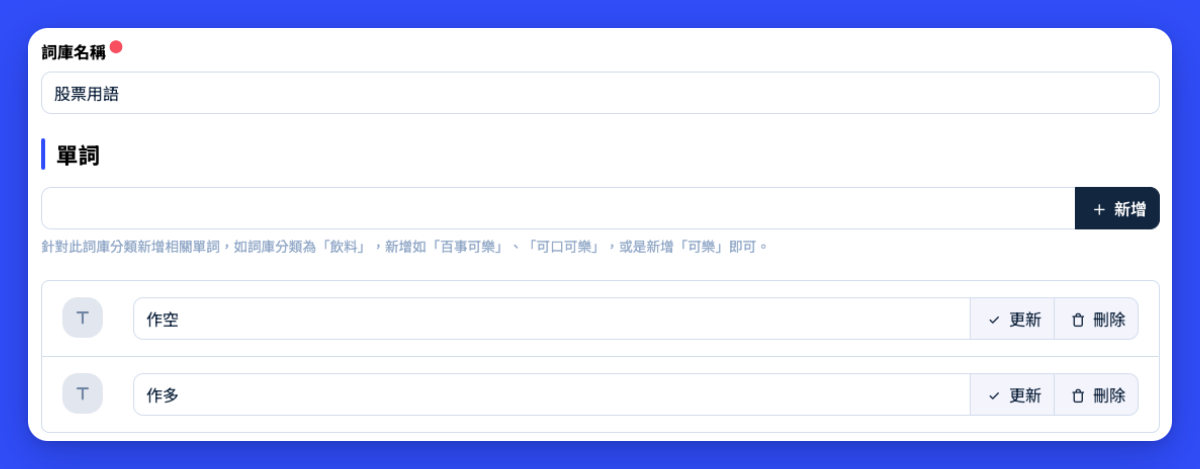
You can click "Thesaurus" under the "Chatbot" category in "Applications" to add more proper nouns, which helps the legacy NLP matching mechanism understand company-specific terminology.
For example, if a customer enters "How do I short sell?" and "short sell" is a special term in the company's domain, you can add a "Stocks" category and include the term "short sell" to help the system recognize such messages.
### User utterances
User utterances are example common questions provided to the traditional NLP matching mechanism. The system refers to these utterances, knowledge base article titles, and body content to evaluate the degree of match between customer questions and articles.
For example, you can set:
1. When will I receive
2. How many days will it take for the item to arrive
3. Will the package arrive within a few days
4. Will the package arrive within three days
5. The scheduled delivery date and time for the package
6. When will the package be delivered
When a customer asks, "When will my package arrive?" or "I want to check when my package will arrive," the system performs a fuzzy match based on the relevant wording in these utterances and the knowledge base content, then selects the article with the higher match score.
In other words, the customer's question does not need to exactly match the configured user utterances, but if the wording varies beyond the originally recognizable range, you may need to add more example sentences or vocabulary.
## Still keep an exit for human service
Whether using traditional NLP or AI responses, it is not recommended to assume automation can handle all customer issues.
It is recommended to keep follow-up flows in the conversation script for when no answer is found, human judgment is needed, or the customer proactively requests human service, such as providing a "Contact human customer service" option or transferring to a service queue.
This way, when automation cannot provide a suitable answer, the service can be smoothly handed off to an agent for continued handling.